View Issue Details

IDProjectCategoryView StatusLast Update
0001724T99X171.00 SKB EagleSW Issuepublic2024-04-05 13:20
Reporter(ALTech) JunGyu Kim Assigned To(SW) Jason LingDue Date2023-05-31 10:01
PrioritylowSeveritys4-minorReproducibilityalways
Status closedResolutionfixed 
Summary0001724: [Smart3][ATV12][Passive standby] If CEC is enabled, the LED is blinking red for a while when exit passive standby mode.
DescriptionHi Kerwin,

Our QA found an issue that if CEC is enabled, the LED is blinking red for a while when exit passive standby mode.
Because of these symptoms, upgrade popup is not showing when exit passive standby mode.

The strange thing is, if CEC is disabled, this symptoms is not occurring.

Test procedure:
1. Active passive standby mode.
2. Enable CEC by Home -> MY -> "시스템 설정" -> set "TV 전원 제어" to "사용함"
3. Enter passive standby mode by press power key.
4. wait for a while about 20 seconds.
5. While exit passive standby mode, we can check the LED is blinking to red for a while. The upgrade popup is not occurred.

6. Disable CEC by Home -> MY -> "시스템 설정" -> set "TV 전원 제어" to "사용안함"
7. Enter passive standby mode by press power key.
4. wait for a while about 20 seconds.
5. While exit passive standby mode, LED is not blinking to red. The upgrade popup is occurred.

Please check this issue.
Thank you
TagsNo tags attached.
Attach Tags

Users monitoring this issue

Activities

(ALTech) JunGyu Kim

2023-06-08 13:28

developer   ~0013313

Hi Kerwin,

Please update the progress of this issue.

Thank you
Kim

(SW) Jason Ling

2023-06-08 16:52

developer   ~0013318

Last edited: 2023-06-08 16:56

Hi JunGyu,

I can not reproduce your issue, I think it's random.
Please refer to my video, I've enabled CEC, after resume from passive standby, the led change from blue to white, I don't see the network error dialog and OTA dialog.

In my opinion, I think you should check it with SPTEK/Digicap, when STB go to the passive standby, the power of network will be shutdown,
when STB resume from passive standby, the network will not resume very fast (depend on system loading).

so sometime, if HomeUI/Middleware detect that network is OK, they can pop OTA dialog
but sometimes, if HomeUI/Middleware detect that network is disconnect, they will set led to red color, and show the network disconnect dialog, and not show OTA dialog.

Because the speed of network resume is not fix value, HomeUI/Middleware should add some tolerances to check network state, (not check it immediately after resume from passive standby)

If you test ActiveStandby, the network will not disconnect, so the behavior is normal.

Thanks,
Jason

(ALTech) JunGyu Kim

2023-06-08 18:26

developer   ~0013320

Hi Jason,

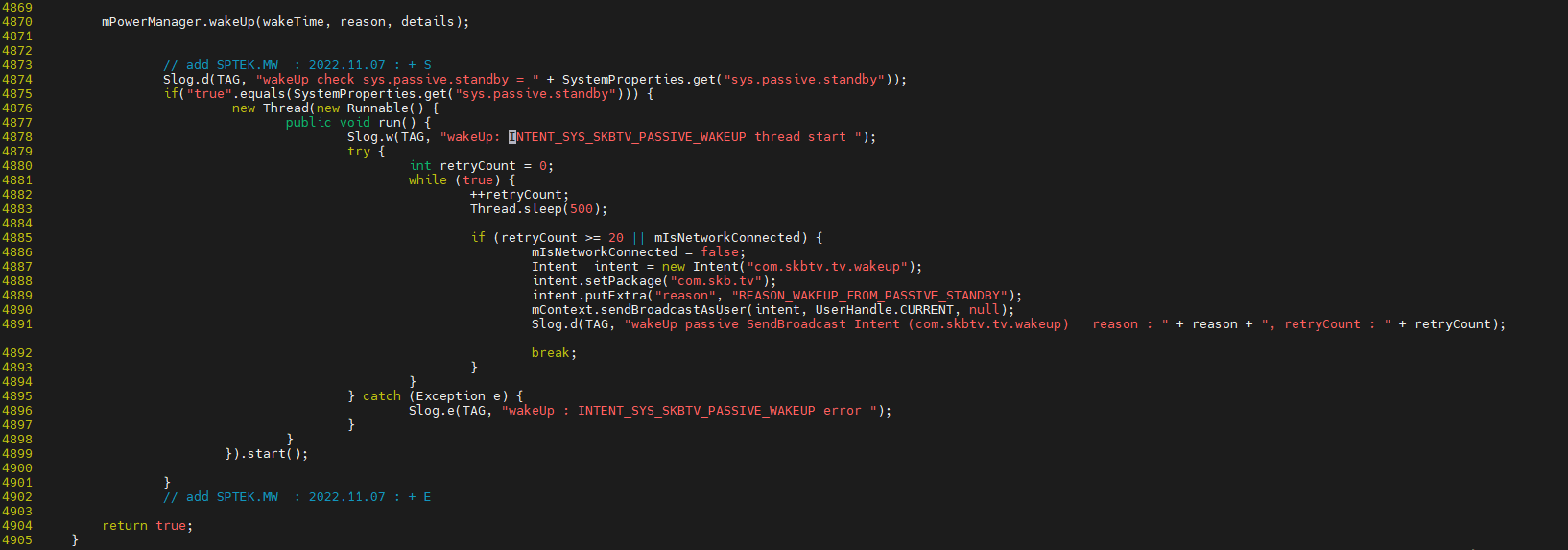
Due to a similar issue, SPTEK modified that polling the network status and send a wakeup intent to MW-> HomeUI when network CONNECTED.
You can refer to PhoneWindowManager.java.

The current problem is that a network error occurs for a while when CEC is enabled.
It seems that if CEC is enabled, the network is connected is slowed down.
I would like to ask if it is possible to analyze this.

In addition, I have attached a video that I reproduced.
When the power key is pressed after the log below is output in the serial log, it is reproduced.

phy_addr: 0x0
hpd_chg: 0->2
phy_addr: 0x3000

Thank you.
Kim
PhoneWIndowManager.java.png (46,656 bytes)   

(SW) Jason Ling

2023-06-08 19:00

developer   ~0013321

Hi JunGyu,

>>It seems that if CEC is enabled, the network is connected is slowed down.
I don't think so. In my test environment. I see the case randomly, Usually, I can not see the red color led.
The reason may be our environment do not have LiveTV. Wakeup time may be shorter than yours.

The passive standby means "suspend to ram". When the STB wake up from passive standby, the STB need back to the previous state.
I agree if you enable the CEC and STB wake up from passive standby. the system will take more time to handling cec event, the network will recover more slowly, but I don't think CEC will impact the network directly.

If you can reproduce it stably, I think you can enlarge the threshold first and test it again.

Thanks,
Jason

(ALTech) JunGyu Kim

2024-04-05 13:20

developer   ~0015376

This issue is not occurring on v15.542.28 so I close this issue.

Issue History

Date Modified Username Field Change
2023-05-22 09:02 (ALTech) JunGyu Kim New Issue
2023-05-22 09:02 (ALTech) JunGyu Kim Status new => assigned
2023-05-22 09:02 (ALTech) JunGyu Kim Assigned To => (SW) Kerwin Chen
2023-05-22 09:02 (ALTech) JunGyu Kim Issue Monitored: (ALTech) SY Yoon
2023-05-22 09:02 (ALTech) JunGyu Kim Issue Monitored: (ALTech) Younkwang Jung
2023-06-08 13:28 (ALTech) JunGyu Kim Note Added: 0013313
2023-06-08 13:35 (SW) Kerwin Chen Assigned To (SW) Kerwin Chen => (SW) Jason Ling
2023-06-08 16:52 (SW) Jason Ling Note Added: 0013318
2023-06-08 16:52 (SW) Jason Ling File Added: CEC_Enable_15.537.50.mp4
2023-06-08 16:56 (SW) Jason Ling Note Edited: 0013318
2023-06-08 18:26 (ALTech) JunGyu Kim Note Added: 0013320
2023-06-08 18:26 (ALTech) JunGyu Kim File Added: PhoneWIndowManager.java.png
2023-06-08 18:26 (ALTech) JunGyu Kim File Added: 20230608_191311.mp4
2023-06-08 19:00 (SW) Jason Ling Note Added: 0013321
2024-04-05 13:20 (ALTech) JunGyu Kim Status assigned => closed
2024-04-05 13:20 (ALTech) JunGyu Kim Resolution open => fixed
2024-04-05 13:20 (ALTech) JunGyu Kim Note Added: 0015376